Sales and CS reps lost 30–45 minutes after every customer call manually writing summaries, extracting action items, updating CRM fields, and drafting follow-up emails. Data was inconsistent or missed, while leadership lacked visibility into customer conversation insights.
01
AI Meeting Intelligence Platform
Owned the full product definition and delivery: from meeting bot to structured CRM output. Automated post-call workflows that previously required 45 minutes of manual work per meeting — zero human steps for routine calls.
+
Opens in Loom ↗
Watch: AI Meeting Intelligence Walkthrough
LOOM VIDEO
5:33
45m
Saved per call
100%
CRM coverage
0
Manual steps
1. Problem
2. Users
- Sales Execs & CS Managers: Needed zero-friction post-call admin and instant follow-up drafts.
- Executive Leadership: Needed structured visibility into risks, deal sentiment, and customer feedback across all calls.
3. Prioritization & Decisions
Prioritized automated CRM field updates and follow-up email drafting over real-time live assistance to eliminate the highest-friction manual work first. Selected a specialized pipeline (bot capture → Whisper transcription → LLM insight extraction) rather than a generic assistant to guarantee structured output schemas.
4. User Stories & Requirements
5. Solution
Built an end-to-end meeting intelligence platform: custom calendar bot joiner, dual Whisper/native transcription pipeline, LLM summary & action item engine, and automated CRM record syncing with custom email draft generator.
6. Execution
Led product scoping and user research with Sales Execs and CS managers. Defined persona journeys, prompt schemas, and JSON output specs. Collaborated with core engineering team across 2-week sprints to deliver bot capture, whisper transcription, and CRM sync integration.
7. Outcome & Impact
Eliminated manual post-call admin for routine meetings. Reps now review auto-generated summaries and structured CRM updates instead of typing notes from scratch.
8. Metrics & Measurement
Signals tracked to evaluate: 45 minutes saved per call, 100% CRM coverage, 0 manual steps required for routine calls.
02
Action Center — AI Agent Fleet Management Console
Defined and built the command center for monitoring, approving, and auditing 25+ autonomous AI agents operating across 6 operational domains. Resolved the critical governance bottleneck: giving humans real-time control without slowing down agent execution.
+
1. Problem
As autonomous AI agents scaled across 6 operational domains, operators lacked visibility into agent reasoning, pending approvals, and execution failures. High-risk actions (e.g. data overwrites, external communications) required strict human-in-the-loop governance without creating operational bottlenecks.
2. Users
- Ops Managers & Domain Leads: Needed centralized approval queues, execution trace visibility, and instant kill-switches.
- Engineering Team: Needed structured step logs, retry mechanisms, and error telemetry to debug agent failures.
3. Prioritization & Decisions
Prioritized a unified Human-in-the-Loop (HITL) approval queue and agent kill-switch controls over advanced analytics to secure safe operational deployment first. Implemented shared governance and audit models across all 6 domains rather than building custom consoles per agent fleet.
4. User Stories & Requirements
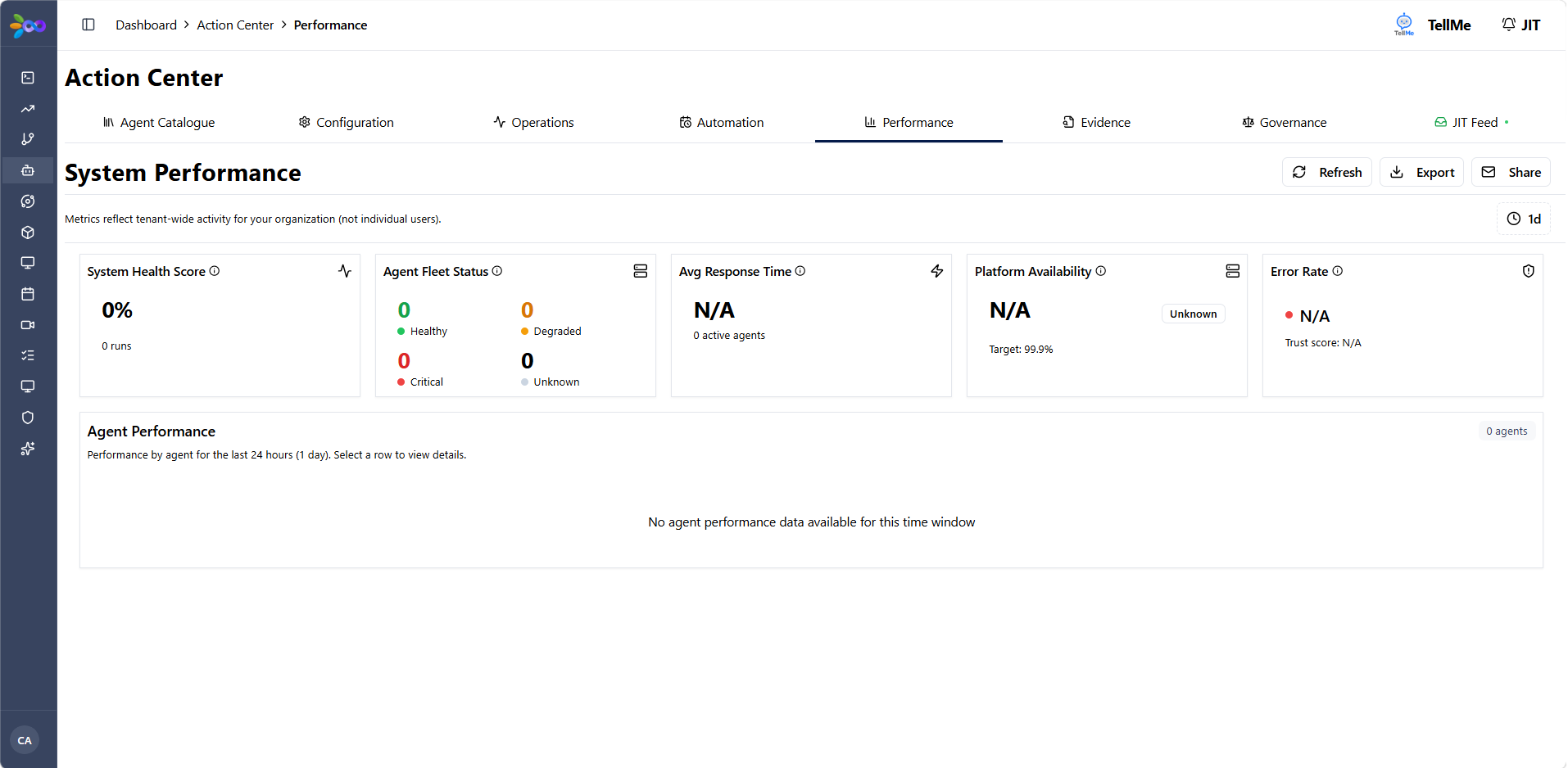
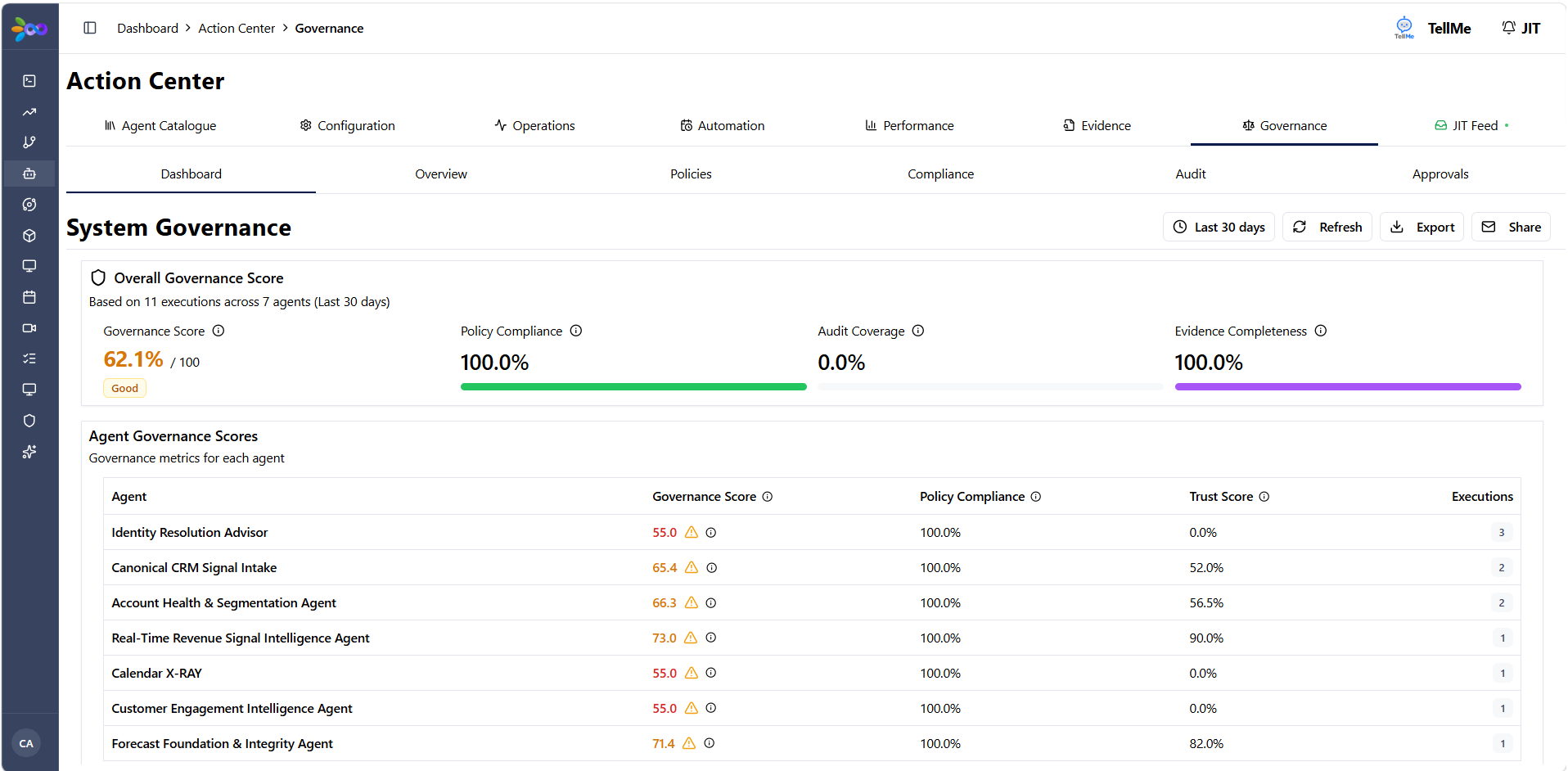
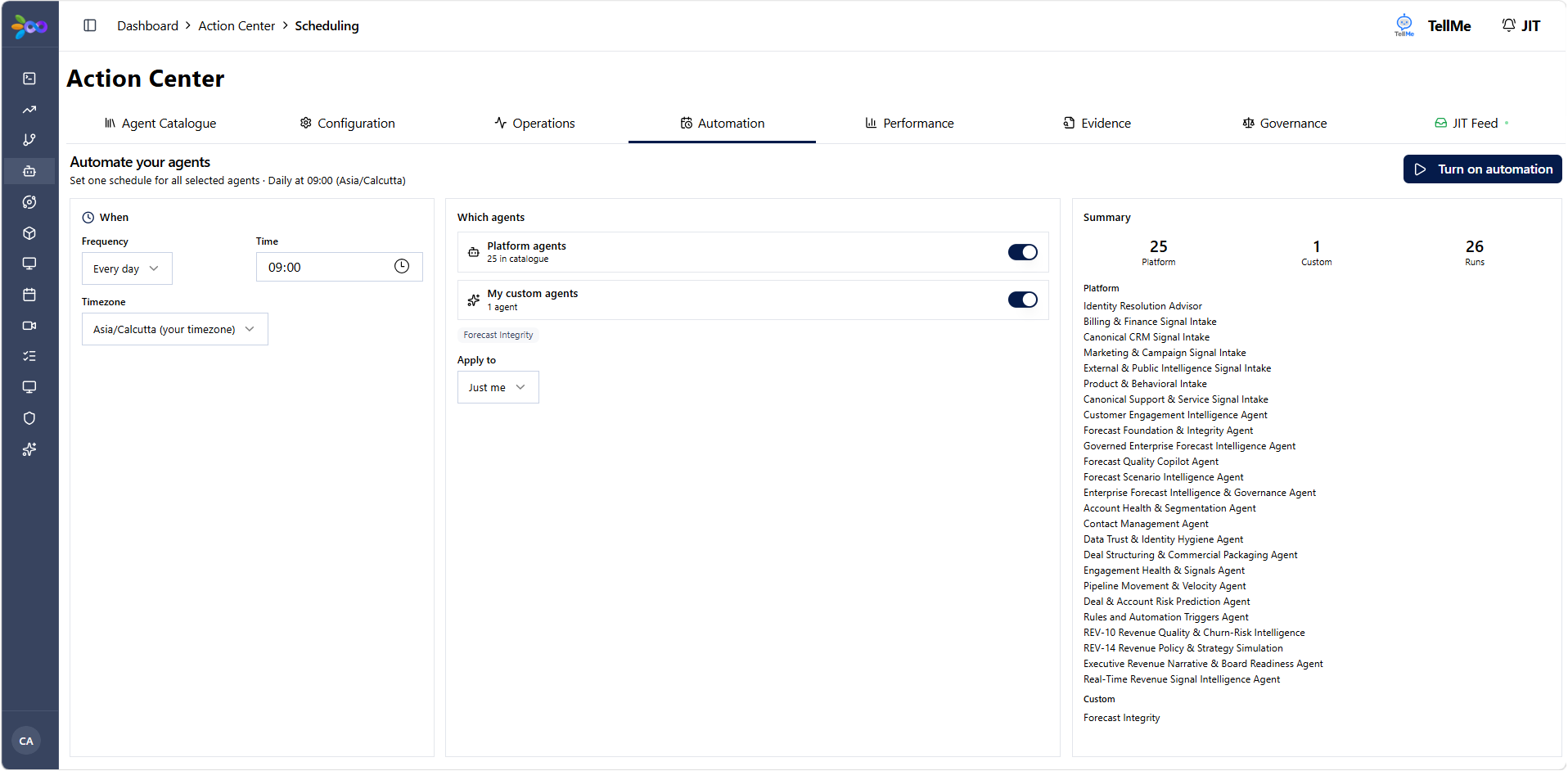
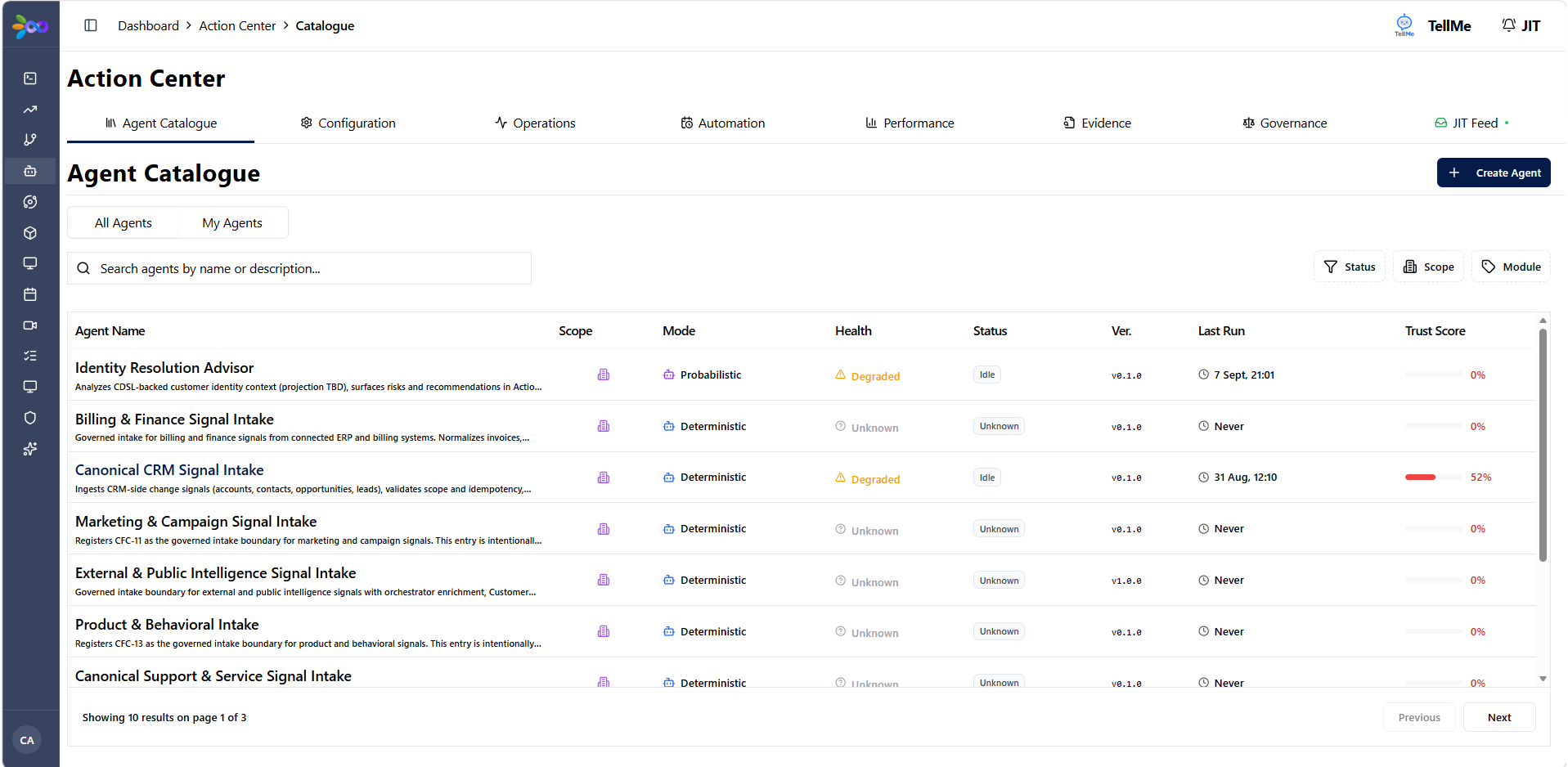
Interface Screenshots
Click to enlarge ↗
5. Solution
Designed the Action Center console featuring 4 core views: Fleet Health Monitor, HITL Approval Queue, Agent Execution Trace, and Domain Governance Controls. Integrates directly with the 25+ AI agent ecosystem.
6. Execution
Defined full UI/UX specifications, telemetry requirements, and state machines. Worked closely with 10 engineering team members across 7 consoles to deploy unified WebSocket status streaming and audit log pipelines.
7. Outcome & Impact
Provided complete operational safety and auditability for 25+ agents. Operators now manage fleet approvals in under 30 seconds per request with full trace visibility.
8. Metrics & Measurement
25+
Agents monitored
6
Domains governed
100%
Audit lineage
03
Pipeline Intelligence & Revenue Operations Workspace
Architected a multi-workspace RevOps platform replacing fragmented CRM views with unified pipeline intelligence, deal risk scoring, and automated account hierarchy tracking.
+
1. Problem
Revenue leaders lacked a single source of truth for deal progression, account hierarchies, and deal slippage across multiple CRMs. Sales managers spent hours stitching together spreadsheets to conduct weekly pipeline reviews.
2. Users
- VP of Sales & RevOps Directors: Needed macro pipeline visibility, stage velocity insights, and deal slippage tracking.
- Account Executives & Sales Managers: Needed clear account hierarchy trees and risk scores to unblock slipping deals.
3. Prioritization & Decisions
Prioritized the "Who Needs Attention → What I Learned → What I Recommend → What I Prepared" decision chain to structure deal health views. Focused on multi-CRM canonical data reconciliation first before surfacing deal health scores.
4. User Stories & Requirements
Interface Screenshots
Click to enlarge ↗
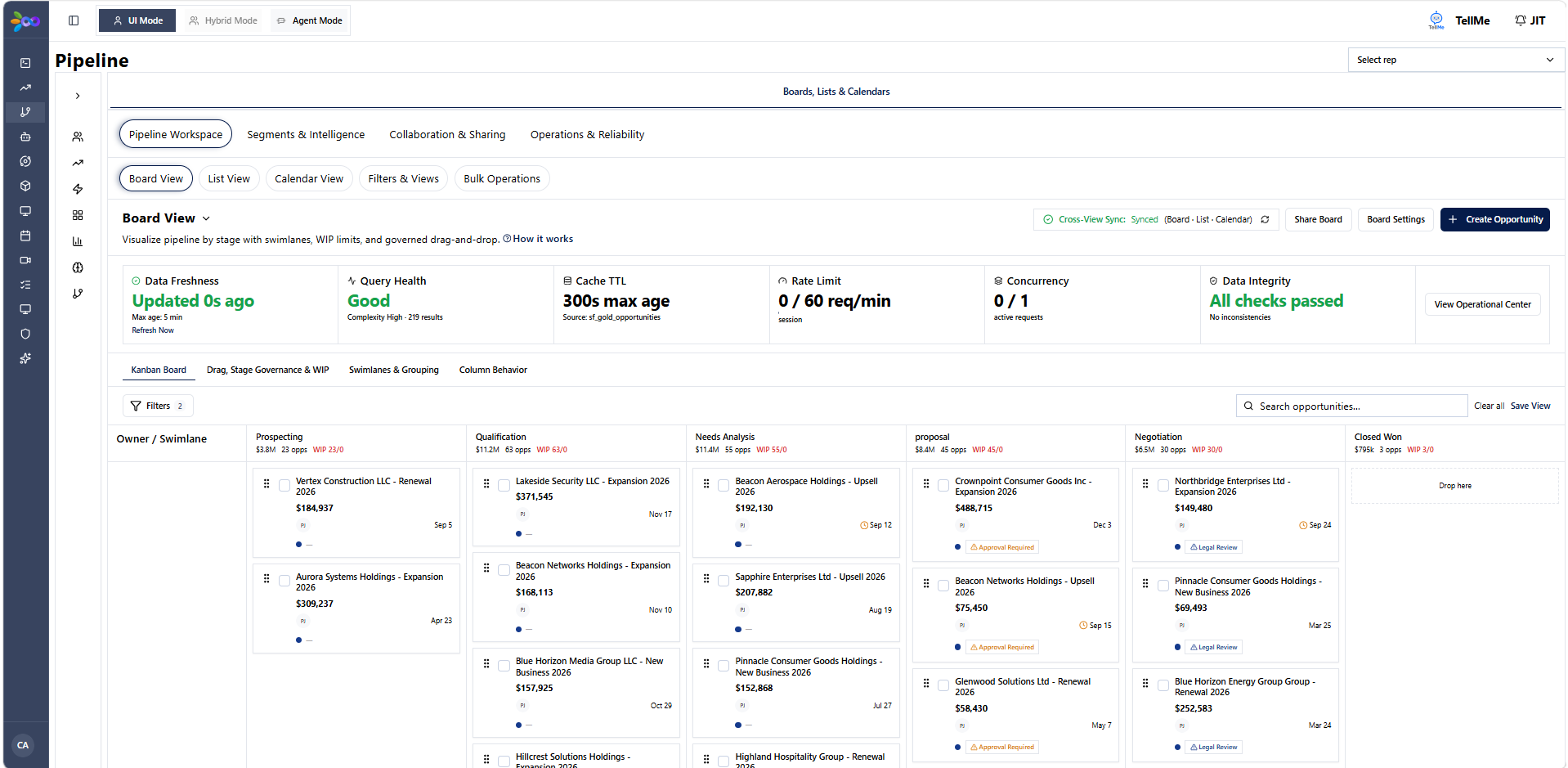
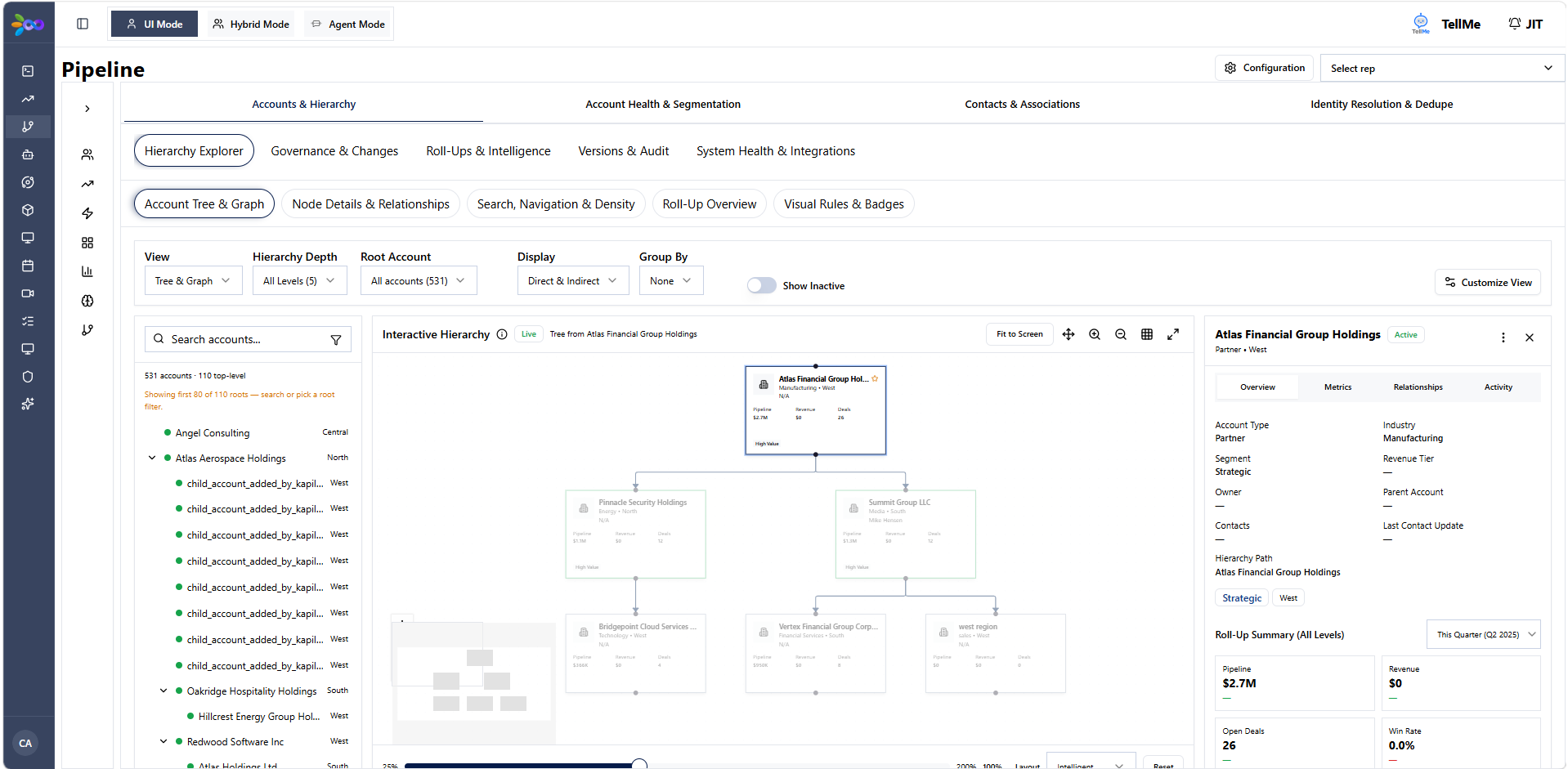
5. Solution
Delivered 3 dedicated workspaces: Deal Health Matrix, Account Hierarchy Tree View, and Stage Velocity & Slippage Tracker, backed by canonical data models.
6. Execution
Partnered with engineering and RevOps stakeholders to spec canonical schema mappings, data transformation pipelines, and custom workspace views across 3 core workspaces.
7. Outcome & Impact
Consolidated pipeline intelligence into one interactive workspace. Reduced pipeline audit prep from hours to minutes.
8. Metrics & Measurement
3
Workspaces
100%
Pipeline visibility
04
Forecast Variance, Targets & Planning Suite
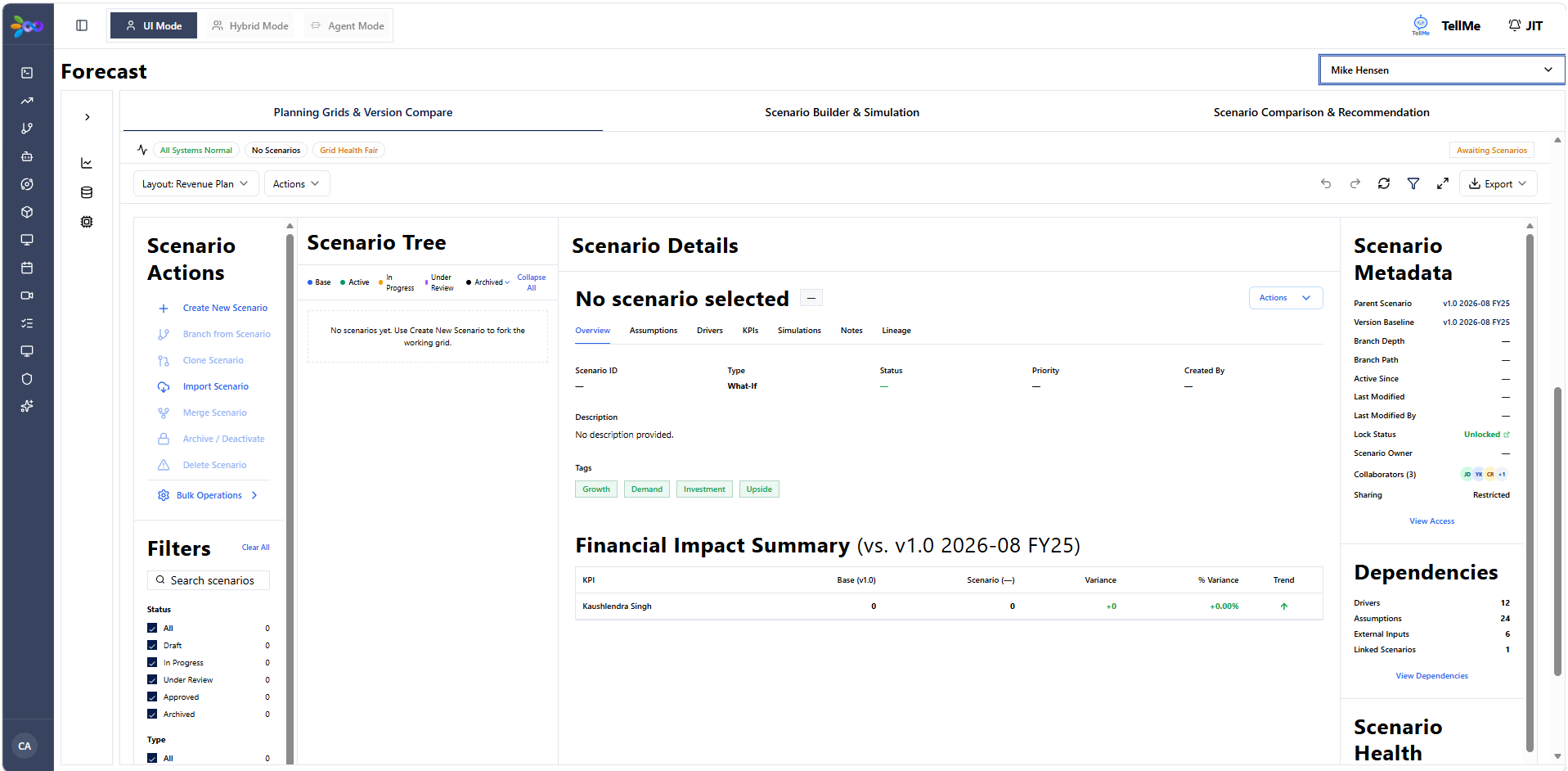
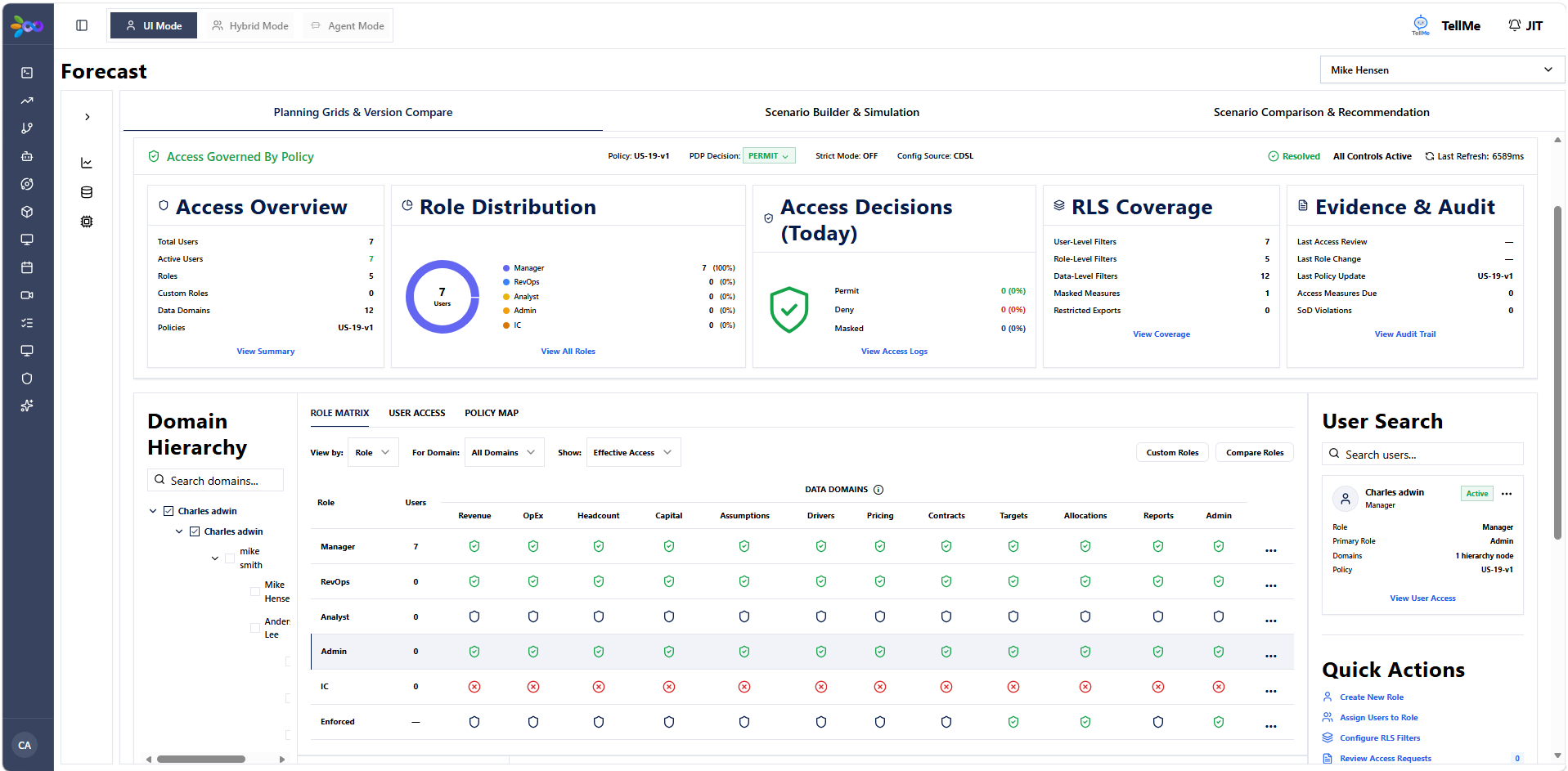
Built an enterprise revenue forecasting suite with real-time target tracking, variance analysis, scenario modeling, and full audit lineage.
+
1. Problem
Executive leadership relied on static spreadsheet models to track revenue targets, resulting in forecast discrepancies, unrecorded overrides, and lack of scenario planning capabilities during quarterly board reviews.
2. Users
- CFO & VP of Finance: Needed waterfall variance analysis, audit-trailed target overrides, and real-time target vs actual tracking.
- RevOps & Regional Sales Leads: Needed scenario simulation tools to model best/worst/commit cases.
3. Prioritization & Decisions
Prioritized robust audit trails and governance controls before scenario simulation modeling to ensure financial data integrity and compliance across all sub-modules.
4. User Stories & Requirements
Interface Screenshots
Click to enlarge ↗
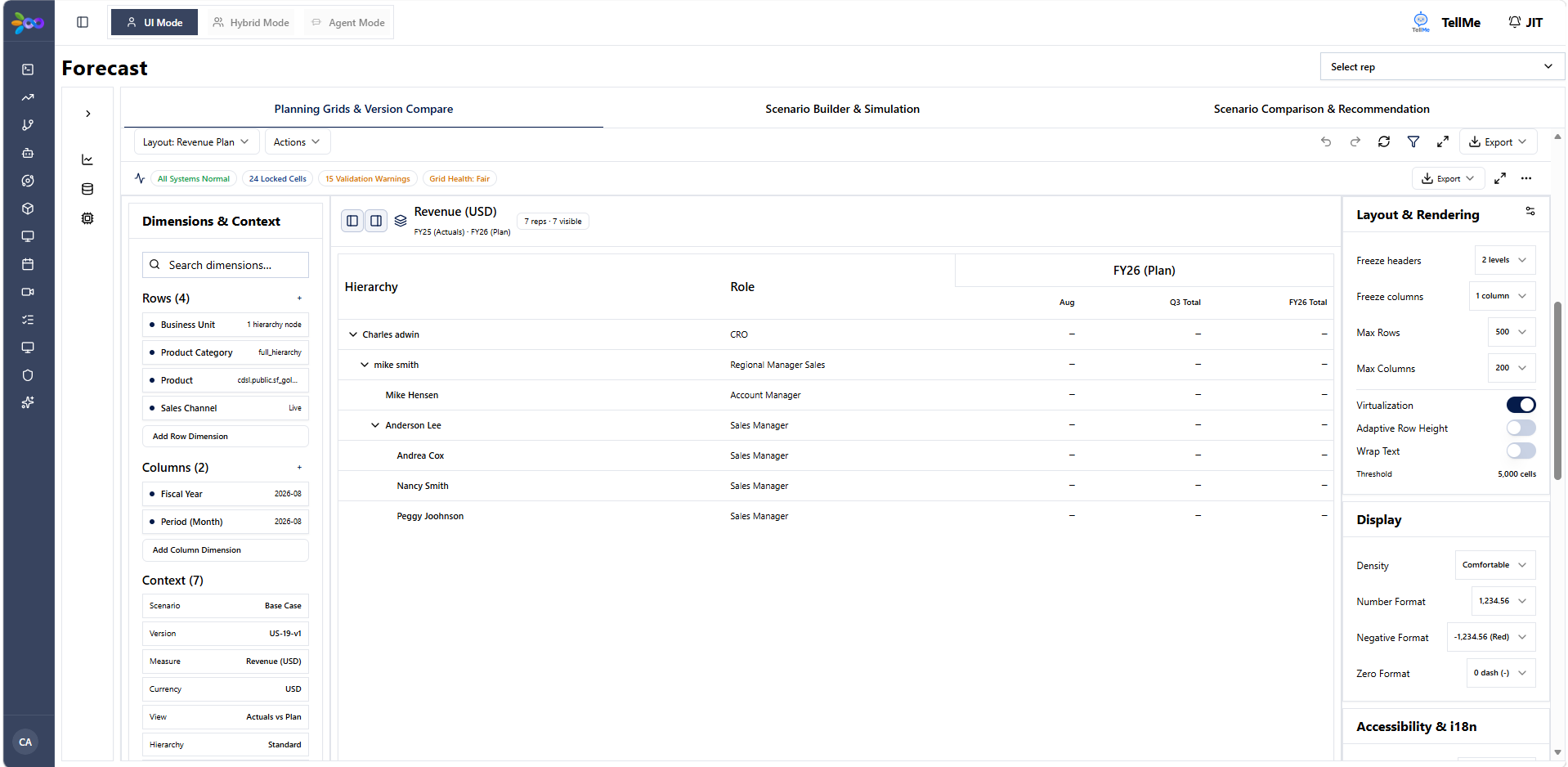
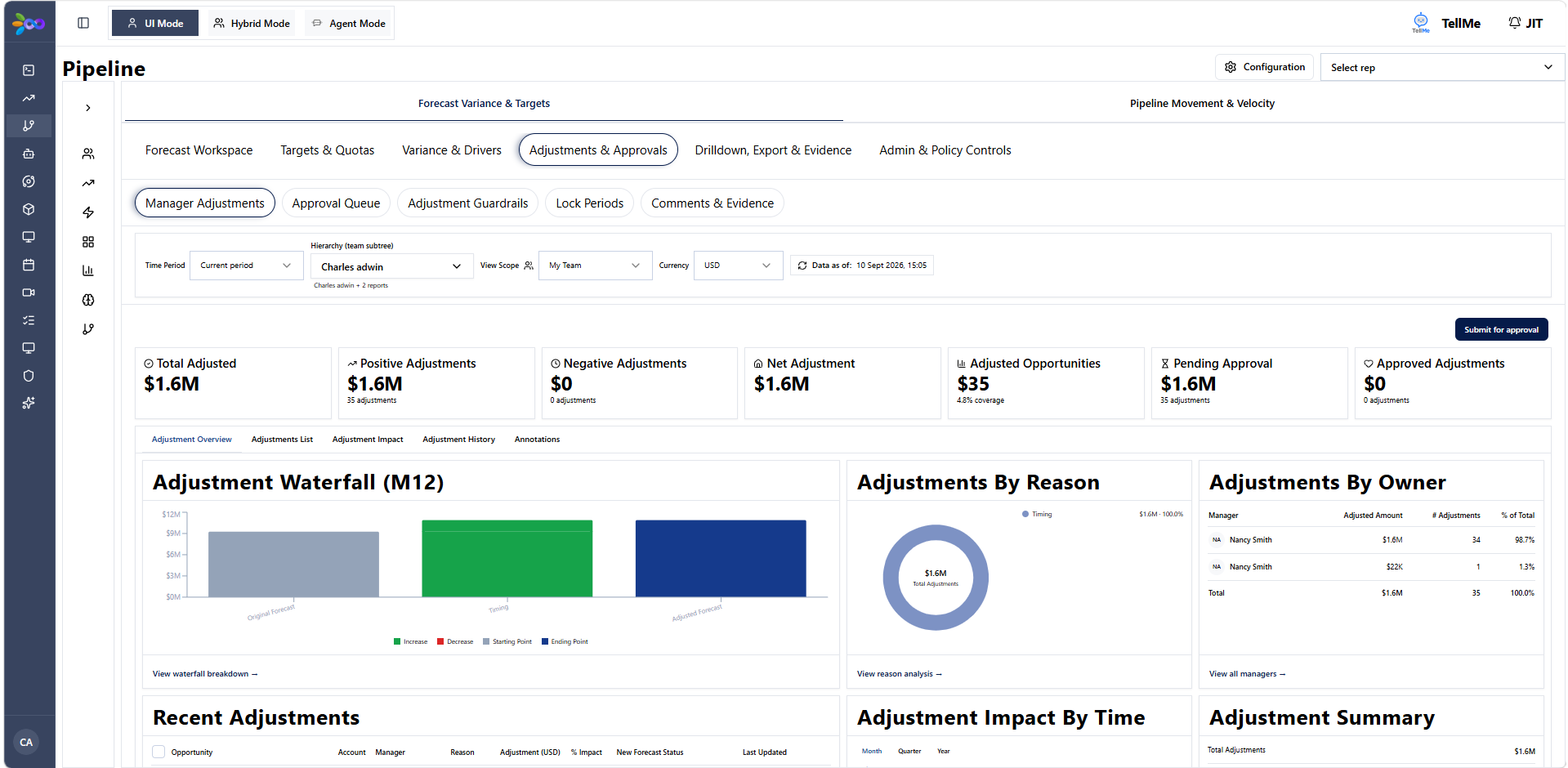
5. Solution
Designed and launched an enterprise forecasting suite featuring 8 forecast sub-modules, including Waterfall Analysis, Scenario & Simulation Planner, and Governance Access Control Matrix.
6. Execution
Led product architecture for 8 forecast sub-modules. Collaborated with Finance and RevOps teams to define target allocation algorithms and role-based access matrices.
7. Outcome & Impact
Replaced manual spreadsheet forecasting with a real-time, audit-trailed planning system supporting instant scenario simulations.
8. Metrics & Measurement
8
Sub-modules
100%
Audit Lineage
05
Revenue Command Center Dashboard
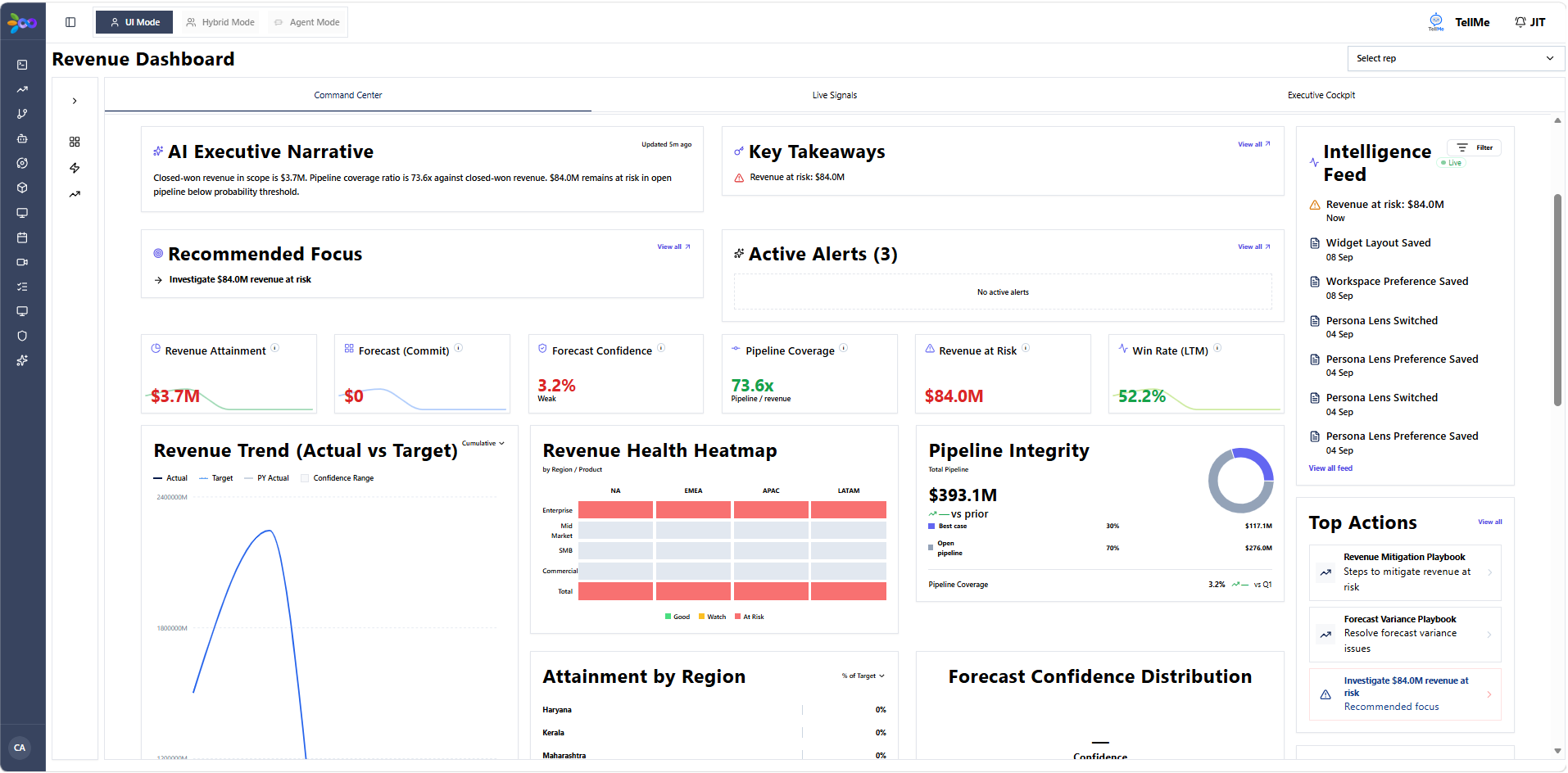
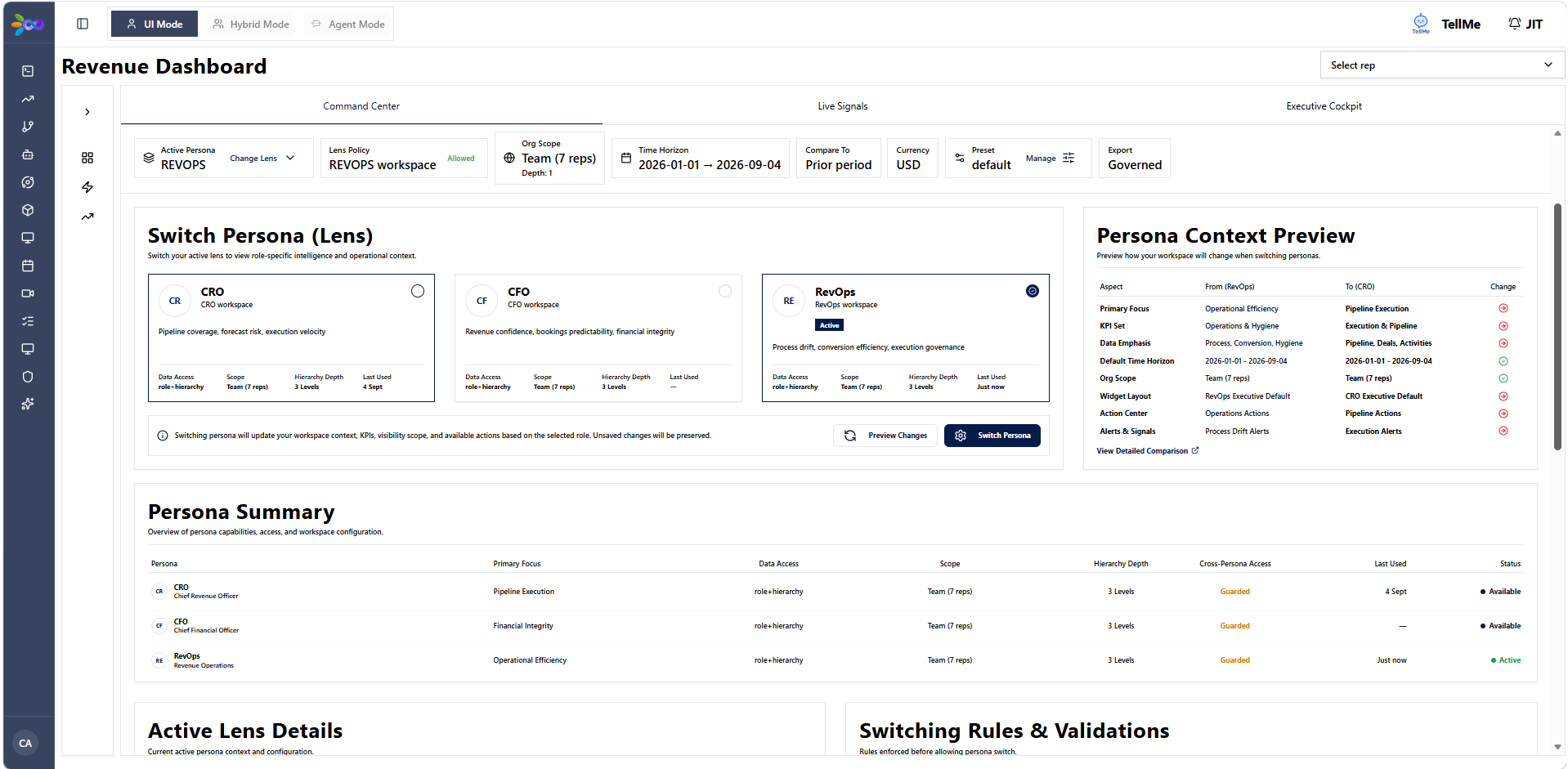
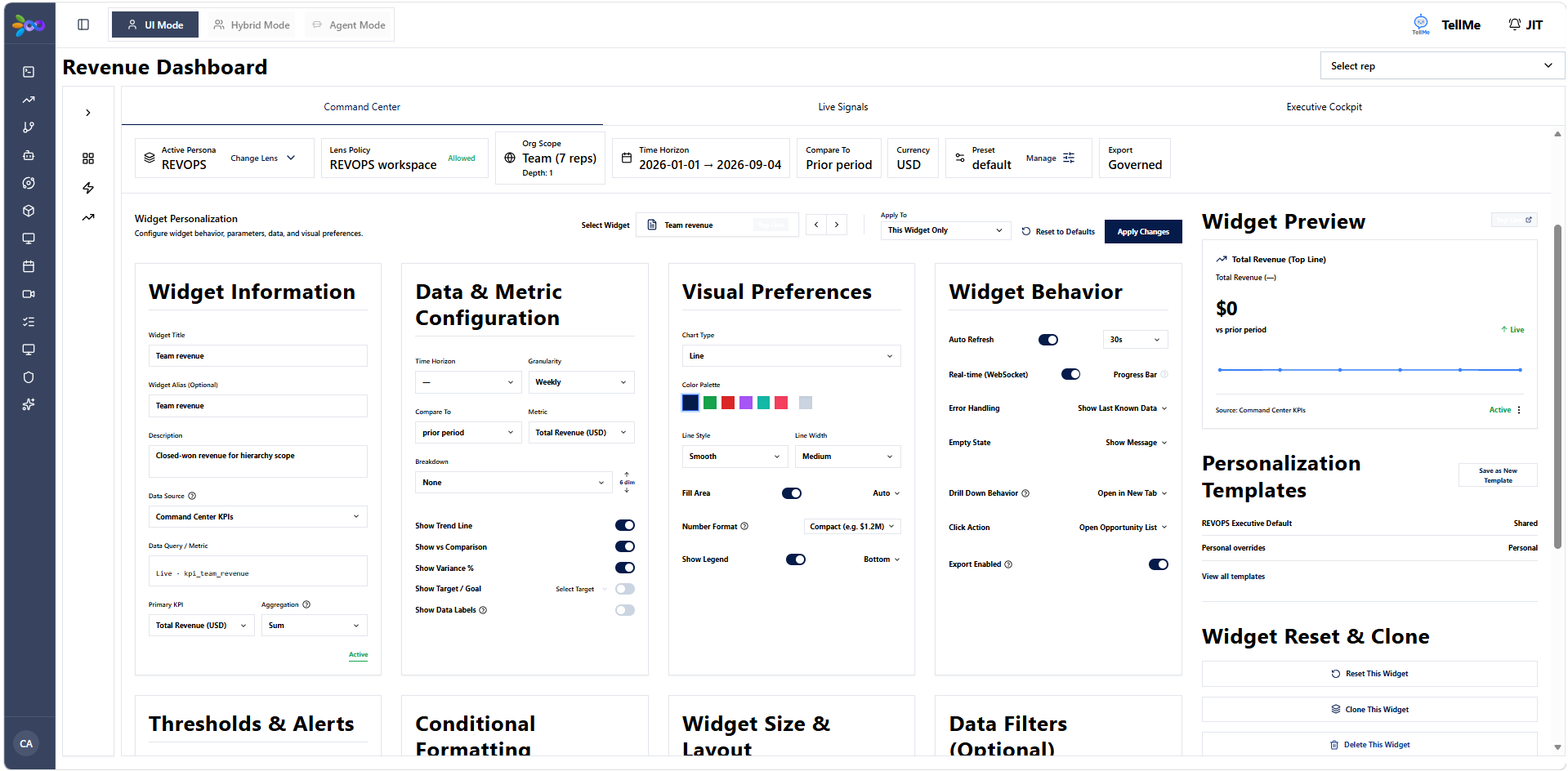
Designed an executive command center consolidating cross-functional revenue metrics across sales, marketing, and CS into a unified real-time dashboard.
+
1. Problem
CEOs and Founders lacked a single operational cockpit to track revenue health across marketing acquisition, sales velocity, and CS retention, resulting in delayed decision-making.
2. Users
- CEO & Founder's Office: Needed high-level KPI summaries, real-time anomaly alerts, and cross-functional drill-downs.
3. Prioritization & Decisions
Prioritized a dense 8-tab executive grid architecture allowing instant navigation across executive summary, funnel health, and anomaly feeds without context switching.
4. User Stories & Requirements
Interface Screenshots
Click to enlarge ↗
5. Solution
Delivered the Revenue Command Center Dashboard featuring an 8-tab architecture, executive KPI grid, cross-functional funnel metrics, and real-time anomaly alert feeds.
6. Execution
Architected dashboard widgets, data freshness indicators, and drill-down states across 8 core tabs in direct collaboration with leadership.
7. Outcome & Impact
Provided executive team with a unified real-time revenue cockpit for weekly operational reviews.
8. Metrics & Measurement
8
Tabs
Real-time
Alert feed
06
Manager Action Planning & Coaching Console
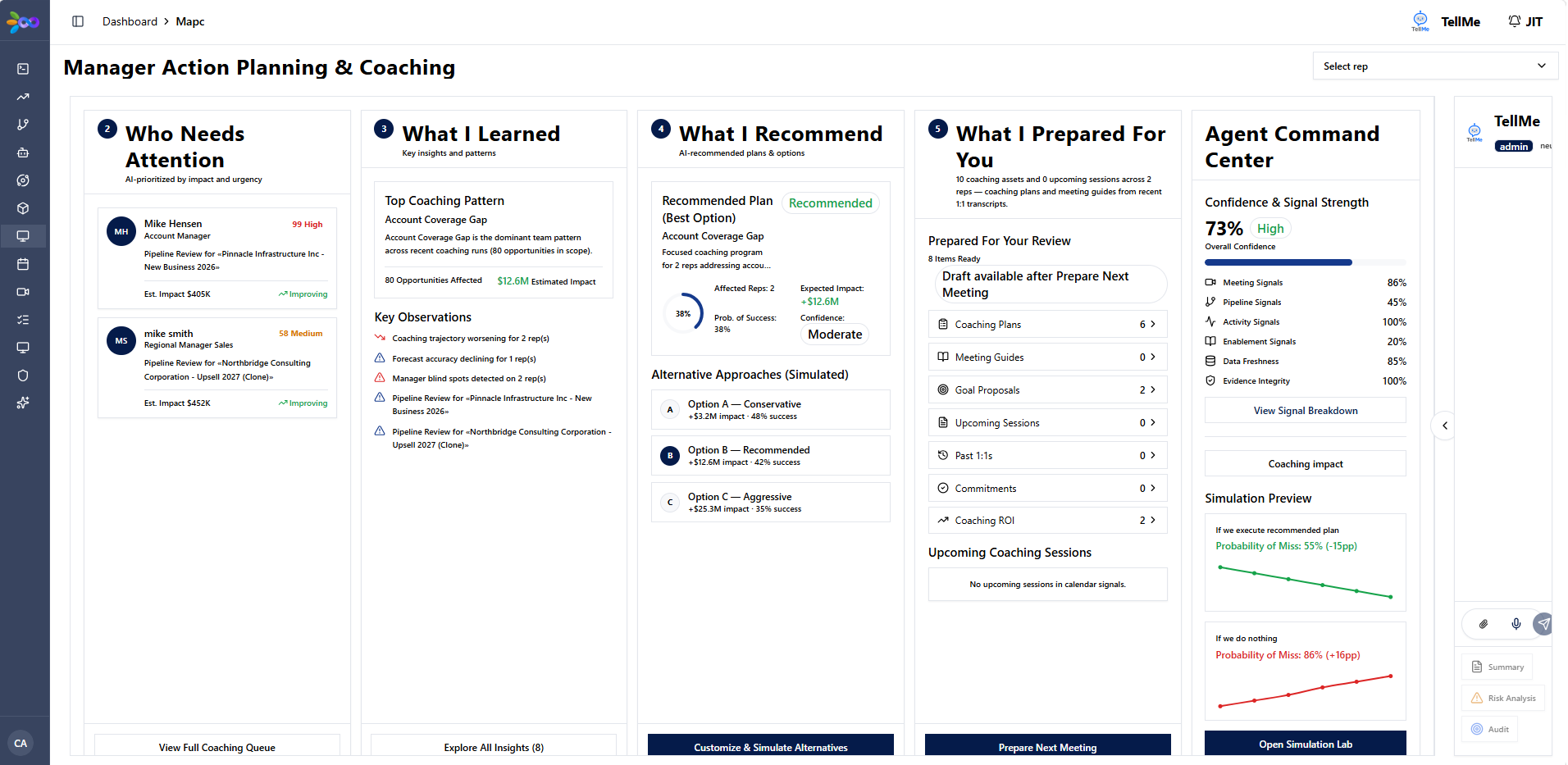
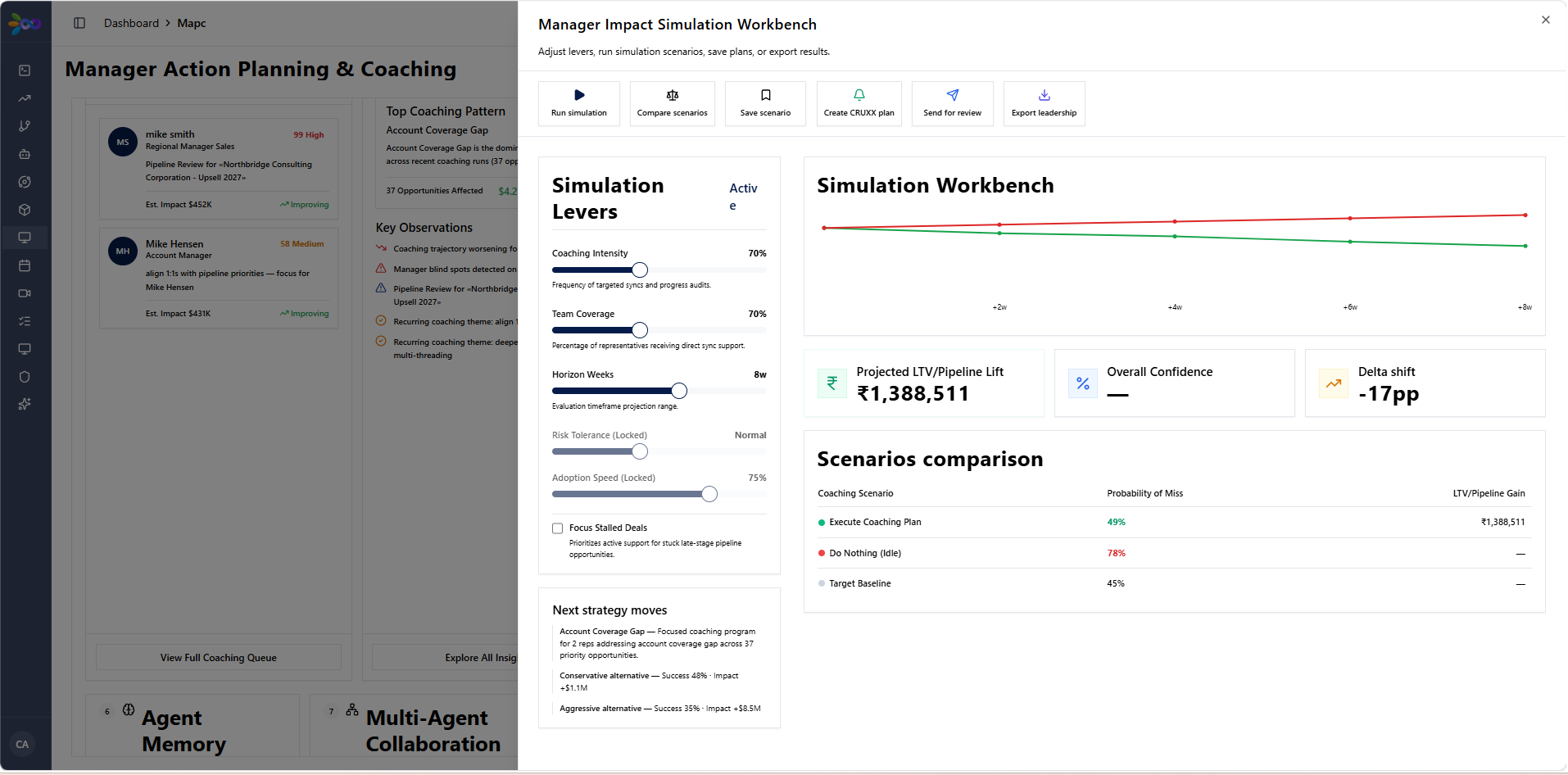
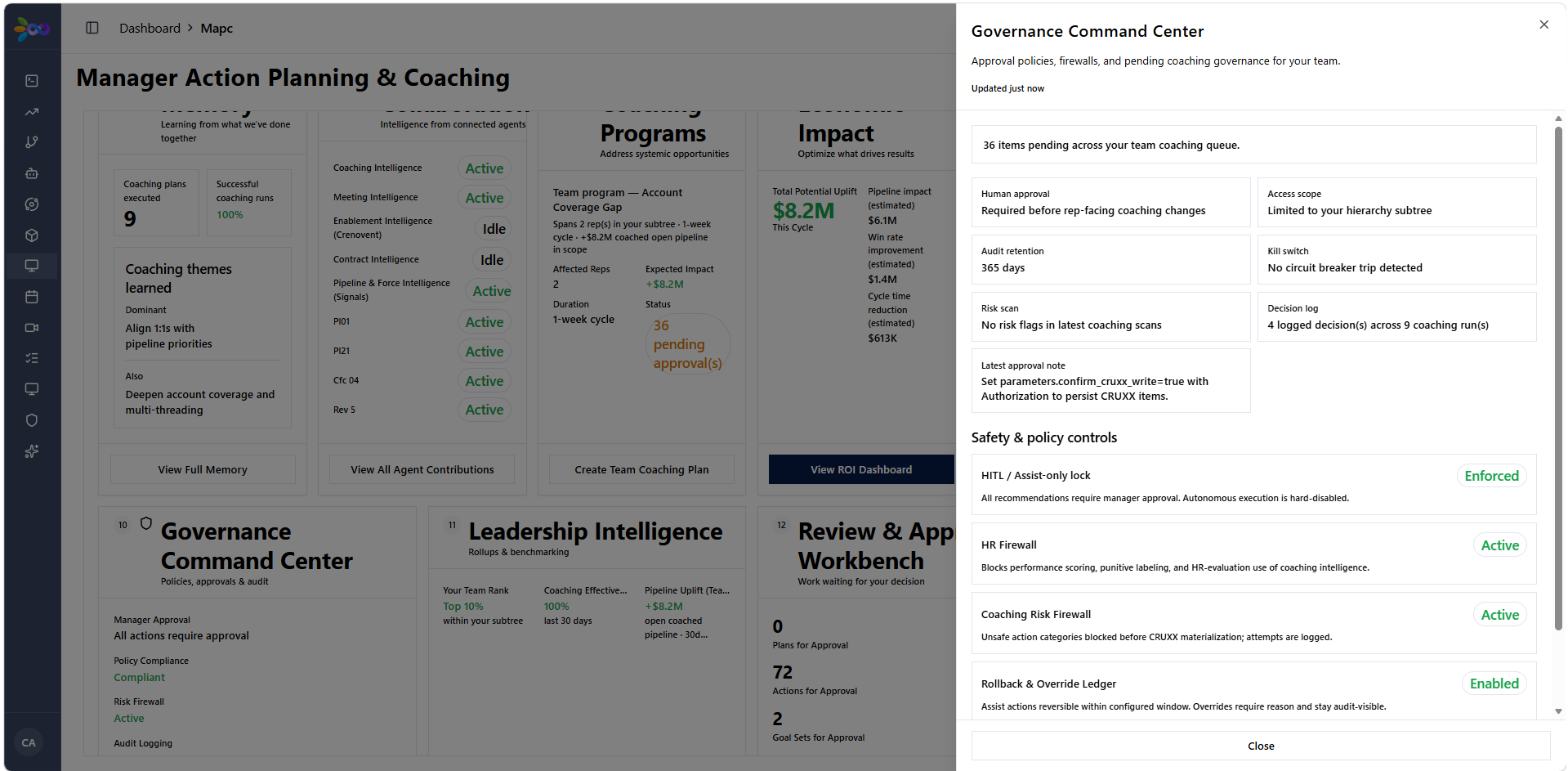
Created an AI-assisted coaching console for sales managers, converting call insights and performance telemetry into structured 1:1 action plans.
+
1. Problem
Sales managers spent hours manually reviewing meeting recordings and CRM activities to prepare for weekly 1:1 rep coaching sessions, resulting in inconsistent feedback cycles.
2. Users
- Sales Managers: Needed automated rep performance matrices, AI-generated coaching briefs, and tracked 1:1 action plans.
3. Prioritization & Decisions
Prioritized a 7-tab interface focused on actionable rep skill gaps rather than raw activity volume counters to drive meaningful rep improvement.
4. User Stories & Requirements
Interface Screenshots
Click to enlarge ↗
5. Solution
Designed the Manager Action Planning & Coaching Console featuring 7 tabs, including Rep Performance Matrix, AI-Generated Coaching Briefs, and 1:1 Action Plan Tracker.
6. Execution
Specced AI recommendation prompts and manager feedback loops across 7 tabs in collaboration with sales leadership.
7. Outcome & Impact
Streamlined manager 1:1 prep into a structured data-driven workflow across rep teams.
8. Metrics & Measurement
7
Tabs
AI
Coaching briefs
07
Multi-CRM Canonical Data Structure Layer
Architected a unified data abstraction layer above Salesforce, HubSpot, and Zoho. Standardized deal, account, and contact schemas into a single canonical model, eliminating custom integration debt for downstream AI applications.
+
1. Problem
Operating across multiple CRMs (Salesforce, HubSpot, Zoho) created fragmented data schemas, duplicated customer records, and broken downstream AI pipelines. Every new feature required custom point-to-point ETL code.
2. Users
- Engineering & AI Developers: Needed a single unified API schema to build AI agents without worrying about underlying CRM differences.
- RevOps Leaders: Needed consistent cross-CRM reporting and zero data duplication.
3. Prioritization & Decisions
Prioritized a strict bidirectional schema mapping layer over live two-way sync to guarantee data consistency before enabling real-time writes. Decided on a hub-and-spoke canonical model rather than point-to-point translators.
4. User Stories & Requirements
5. Solution
Designed a multi-CRM canonical data layer: unified GraphQL/REST API, automated entity resolution, bidirectional schema translation, and real-time webhook event normalizer.
6. Execution
Led data modeling specs for 30+ core business entities. Coordinated schema mapping contracts with data engineers and downstream AI product teams.
7. Outcome & Impact
Created a single source of revenue data truth. Enabled rapid deployment of 25+ AI agents without CRM-specific re-engineering.
8. Metrics & Measurement
30+
Capabilities
100%
Schema coverage
08
25+ AI Agent Ecosystem — Revenue Operations
Designed and managed a fleet of 26 specialized AI agents spanning 6 operational domains: from lead enrichment and meeting intelligence to churn prediction and automated follow-ups.
+
1. Problem
Revenue operations suffered from repetitive manual bottlenecks across prospecting, enrichment, post-call admin, and account monitoring. Monolithic AI tools failed to handle multi-step domain workflows reliably.
2. Users
- SDRs & Account Executives: Needed automated lead research, instant meeting briefs, and smart follow-up drafts.
- Customer Success Leads: Needed automated account health monitoring and early churn signal detection.
3. Prioritization & Decisions
Prioritized a modular multi-agent network (26 narrow agents) over a single monolithic AI assistant to isolate failure modes, optimize prompt contexts, and enforce domain-specific safety guardrails.
4. User Stories & Requirements
5. Solution
Built a fleet of 26 specialized AI agents operating across 6 operational domains, coordinated by central orchestration APIs and shared HITL governance protocols.
6. Execution
Defined product specs, agent roles, memory boundaries, and evaluation metrics for all 26 agents. Led cross-functional delivery across product and AI engineering teams.
7. Outcome & Impact
Automated end-to-end RevOps workflows across 6 domains, reducing manual operational overhead across the entire revenue funnel.
8. Metrics & Measurement
26
Agents built
6
Domains
09
10-Platform Enterprise Integration Program
Led the integration strategy and technical execution connecting 10 enterprise platforms — CRMs, communication tools, databases, and analytics suites — into a unified data ecosystem.
+
1. Problem
Core customer and revenue data was isolated across 10 disconnected enterprise platforms (CRMs, communication apps, databases, BI tools), creating data silos and preventing unified operational workflows.
2. Users
- Cross-Functional Teams (Sales, Marketing, CS, Product): Needed seamless data flow across tools without manual CSV exports.
- Enterprise IT & Security Leads: Needed strict OAuth controls, rate-limit management, and encrypted data pipelines.
3. Prioritization & Decisions
Prioritized core CRM and communication integrations (Salesforce, HubSpot, Slack, Email) first based on daily operational volume before connecting secondary analytics data stores.
4. User Stories & Requirements
5. Solution
Architected a 13-module integration framework supporting 10 enterprise platforms with centralized auth token management, webhook dispatchers, and error recovery queues.
6. Execution
Specced integration pipelines across 13 modules. Managed API rate-limiting, error fallback logic, and credential security standards in collaboration with engineering.
7. Outcome & Impact
Successfully unified 10 enterprise platforms into a single connected data ecosystem, eliminating manual data re-entry.
8. Metrics & Measurement
10
Platforms
13
Modules
01
Syook CRM Workflow Prototype: Stale vs. On-Hold Deal Status
A CRM workflow prototype for Syook's sales team. Out of six feature asks, I picked the one that fixes the root problem: a 'Deal Truth Layer' that gives every deal one honest status (On Track, Stale or On Hold), so leaders can trust the pipeline and associates aren't blamed for delays outside their control.
+
Opens in Loom ↗
Watch: Deal Truth Layer Prototype Walkthrough
LOOM VIDEO
2:55
4h 40m
Time on task
6
Asks triaged
3
Health states
4
Engineering tasks
1. Problem
The CRM had no honest way to show a deal as "blocked". Leaders couldn't tell whether a quiet deal was stalled at the client or simply neglected, so they couldn't trust the pipeline, and associates got misjudged for delays outside their control.
2. Users
- Farhan, senior sales associate in the Gulf: 12–16 enterprise deals across UAE oil & gas and government accounts. Field-based, so he touches the CRM in gaps between site visits, not at a desk. Needs a fast way to show a deal is legitimately on hold.
- Ananya, regional leader in Noida: reviews pipeline weekly across four time zones. Needs to tell stalled-at-client from neglected at a glance.
3. Prioritization & Decisions
Six asks triaged:
- Build now: Q5 Deal on halt; Q4 Notify if stale a week (a signal, not an alert).
- Merge: Q2 Track pipeline deals (subsumed by the urgency list); Q1 Track team performance (partial, proxy only, no revenue data).
- Build later (V3): Q3 Log documents to deal.
- Kill for V1: Q6 Reassign deal on leave.
Rationale: Q2, Q4 and Q5 trace to one root problem, that the CRM can't show "blocked". Q3 and Q6 are real but don't touch it, so they're deferred and will attach to the same deal record. Q1 is partly answered by a lightweight team rollup.
4. User Stories & Requirements
5. Solution
The Deal Truth Layer: one health status per deal (On Track, Stale, On Hold), replacing guesswork. Built as four tasks:
- T1: deal status state machine: status, hold_reason, hold_resume_date, last_meaningful_update_at.
- T2: staleness derived from status and elapsed time.
- T3: mobile deal list sorted stale-first, then on-track, then on-hold, with filter chips.
- T4: set-on-hold flow on the deal detail screen.
Key rules: the timestamp updates only on real activity, never on read, and is stored in UTC. Held deals auto-revert to active when the resume date passes.
6. Execution
Scoped to a V1 prototype built in 4 hr 40 min (time on task). Engineering was broken into four tasks with explicit dependencies (T1 → T2 → T3; T4 depends on T1 and T3), each with acceptance criteria. Out of scope for V1: document upload, reassignment, real backend/database/auth, push notifications, outcome-based metrics (revenue, win rate, cycle time). Implementation assumptions (CRM event availability, a 7-day default threshold) enabled the prototype; strategy decisions needing stakeholder input remain open.
7. Outcome & Impact
A prototype, not a shipped product. It lets a field associate declare a deal "On Hold" with a reason and resume date, and gives a leader a list that surfaces stale deals first and separates stalled-at-client from neglected. Risks named up front: (1) without existing event timestamps, staleness can't be derived without new instrumentation; (2) associates could use on-hold to dodge scrutiny, mitigated by an auto-expiring resume date.
8. Metrics & Measurement
Outcome metrics (revenue, win rate, cycle time) were deliberately left out of V1. In-product signals: time since last meaningful update (168-hour stale threshold; 7-day default) and on-hold status with resume date.
02
Hexalog Exception Resolution Prototype: AI Agents for Customs Holds
A product concept for Hexalog's ops team. Resolving a shipment exception takes a person 2–3 hours across 4–5 systems today. I scored every exception type, designed AI agents for the highest-scoring one (customs document holds), and set autonomy by the risk of each action, not by model confidence.
+
Opens in Loom ↗
Watch: Hexalog Exception Resolution Walkthrough
LOOM VIDEO
4:59
2–3 hrs
Manual effort today
6
Narrow agents
12
Top priority score
0
Critical failures
1. Problem
Hexalog's platform already surfaces exceptions in real time, but resolving one still takes a person 2–3 hours across 4–5 disconnected systems. Today's flow is notice → search systems → diagnose → contact stakeholders → decide → execute → follow up, with no structured record of why a decision was made. Cost scales with shipment volume, which works against Hexalog's own "scale without expanding your ops team" promise. Exceptions are already a named object in the product; resolution is the gap.
2. Users
- Ops / control-tower executives: investigate and resolve exceptions by hand. They need diagnosis, impact and a ready plan assembled for them, while keeping the decision.
- MSME clients (indirect): their shipments and working capital are held up while exceptions wait.
3. Prioritization & Decisions
Priority = Frequency + Repeatability + Value − Risk-if-wrong (each scored 1–5), a RICE-style approach adapted so downside risk is explicitly penalized. Scores:
- Customs DOC_HOLD: 12, build first.
- Failed delivery attempt: 10, next.
- Warehouse QC hold: 9, next.
- Carrier delay / port congestion: 9, later (low controllability).
- HS classification ambiguity: 5, excluded from autonomy (assistive only).
Decision: build the highest-scoring class first, not the highest-value one. HS classification is the highest value but a judgment call with legal exposure, so the human stays and the system auto-compiles the dossier. Knowing what not to automate is a prioritization decision.
4. User Stories & Requirements
5. Solution
The person stays in exactly one place, the decision, and the system assembles everything on either side: detect → investigate → explain → calculate impact → propose plan; human approves; execute → verify. Six narrow agents, each with one job and an explicit "must never" (for example the Document agent can never submit to a government portal unsupervised, and the Impact agent can never modify an SLA or client commitment). Autonomy is set by policy, per step, by the action's risk class and never by model confidence, in three tiers: Auto (low-risk, reversible, audit-logged), Recommend (agent-prepared, human-executed), Human (regulatory or above-threshold financial, always gated). Policy is configuration, not code. Reject-with-reason halts execution and writes to an audit log that becomes eval data for tuning autonomy thresholds.
6. Execution
Prototype scoped to one exception class (customs DOC_HOLD): the full detect → investigate → propose → approve → execute → verify loop, a real reject path, and a simulation/eval harness over 6 scenarios. Before touching a real shipment, it is tested against 50–100 past exceptions with known outcomes. Autonomy expands only when exit criteria are met on real data: Observe (≥50 live exceptions shadowed; eval set v1) → Recommend (root-cause accuracy ≥90%; ops agree with plan ≥85%) → Assist (≥95% task success, 0 critical failures, sustained 4 weeks) → Resolve (≥90% end-to-end; false-confidence ≤2%; override ≤10%) → Optimize (next class). Out of scope: other exception classes, any autonomous HS action, unsupervised filings, production integration (no access). Key assumption to confirm with engineering in week 1: the platform exposes event streams and allows write-back.
7. Outcome & Impact
A concept prototype, not live. The change: from one person doing all seven steps alone to the system doing everything except the decision, with a structured record of why each decision was made. In the 6 simulated scenarios: 3 solved correctly on their own, 2 correctly escalated to a person, 1 deliberately built failure (91% confident, wrong cause) caught by the verification step and added back to the test set. Modelled business case per 100 exceptions/month: 230 ops-hours saved, ₹4.2L cost avoided, 9 fewer SLA breaches. These are modelled from named assumptions (₹1,800/hr blended ops cost, 2.9h median handling time), not claims.
8. Metrics & Measurement
Goal: reduce ops hours to resolve a customs exception without increasing wrong or unsafe resolutions. Targets: root-cause accuracy ≥90%, task success ≥95%, 0 critical failures, false-confidence ≤2%, human override ≤10%.
03
Ola MoveGrid Product Strategy: A Guaranteed Daily Commute for India, 2035
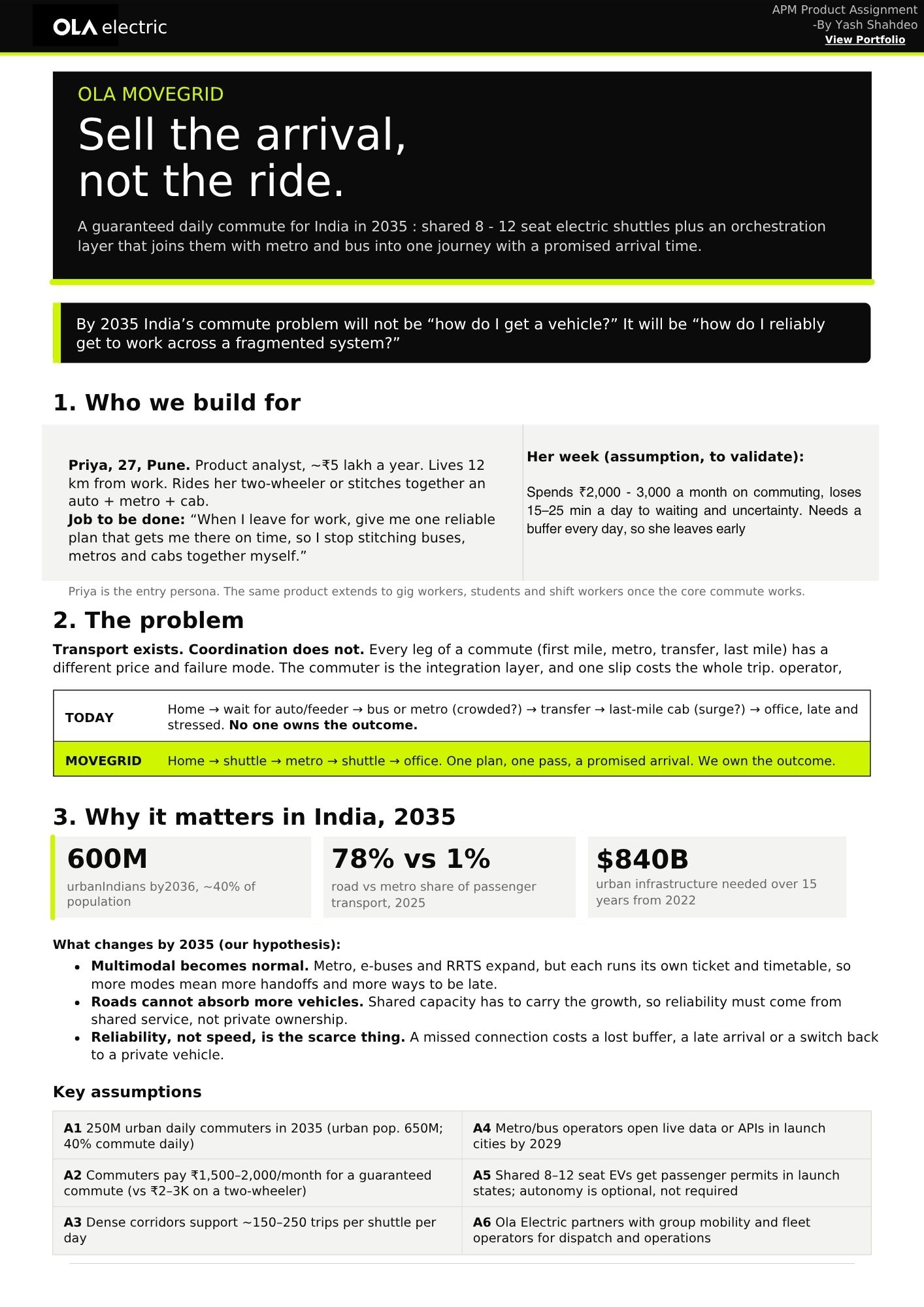
A product strategy for Ola Electric: shared 8–12 seat electric shuttles plus a trip-orchestration layer that joins them with metro and bus into one journey with a promised arrival time. The idea in one line: sell the arrival, not the ride.
+
1. Problem
Transport exists; coordination doesn't. Every leg of a commute (first mile, metro, transfer, last mile) has a different price and failure mode, so the commuter is the integration layer and one slip costs the whole trip. Nobody owns the outcome. By 2035 the question won't be "how do I get a vehicle?" but "how do I reliably get to work across a fragmented system?" Why it matters: ~600M urban Indians by 2036; 78% of passenger transport by road vs 1% metro (2025); $840B of urban infrastructure needed over 15 years from 2022.
2. Users
- Entry persona is Priya, 27, Pune: a product analyst (~₹5 lakh a year) who lives 12 km from work and stitches together a two-wheeler or auto + metro + cab. Assumed, to validate: she spends ₹2,000–3,000 a month on commuting and loses 15–25 min a day to waiting and uncertainty, so she leaves early to keep a buffer. Job to be done: "give me one reliable plan that gets me there on time." Extends later to gig workers, students and shift workers.
3. Prioritization & Decisions
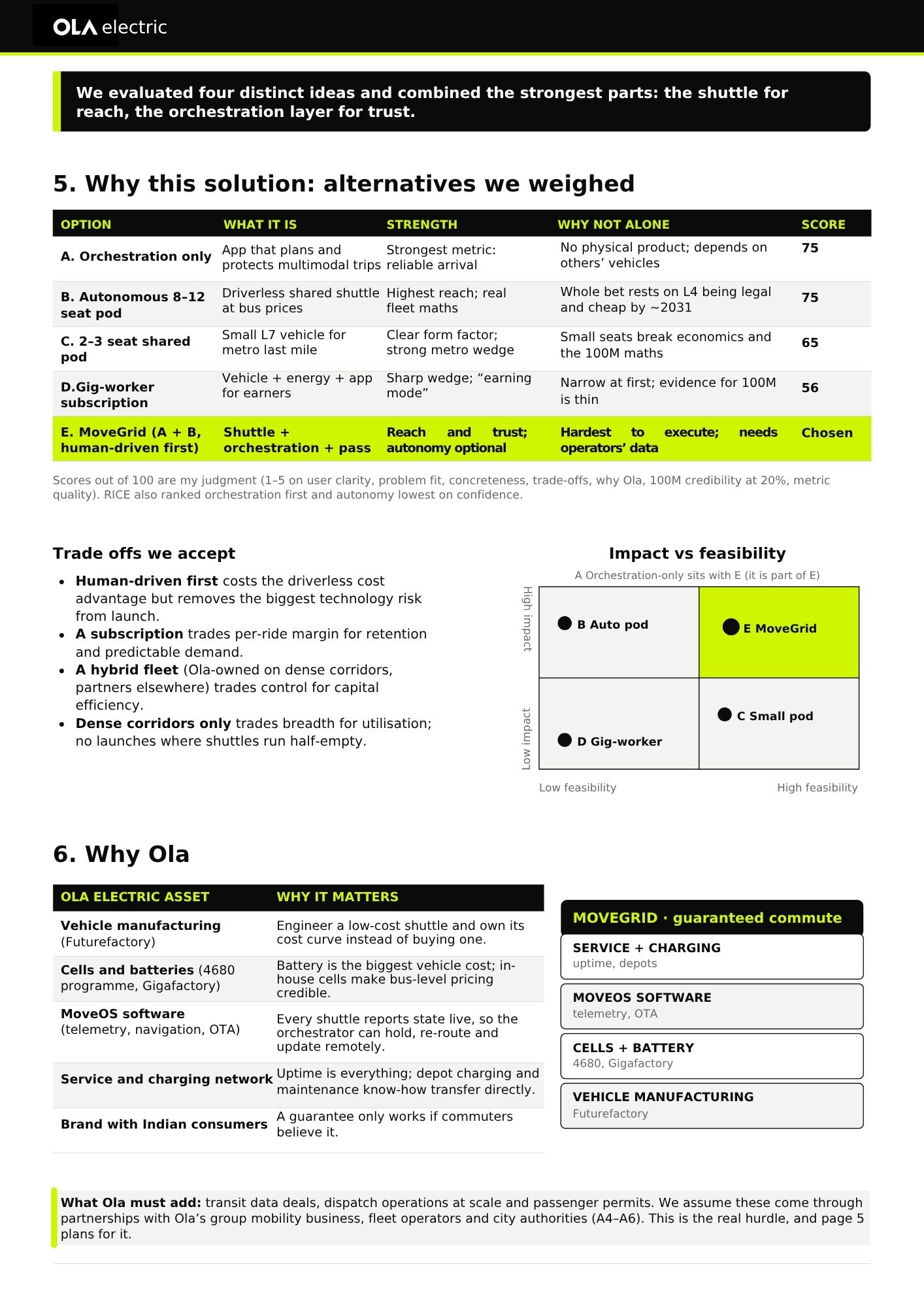
Five options scored out of 100 on my own judgment (user clarity, problem fit, concreteness, trade-offs, why Ola, 100M credibility, metric quality):
- A Orchestration only: 75.
- B Autonomous 8–12 seat pod: 75.
- C 2–3 seat pod: 65.
- D Gig-worker subscription: 56.
- E MoveGrid (A + B, human-driven first): chosen. Shuttle for reach, orchestration for trust.
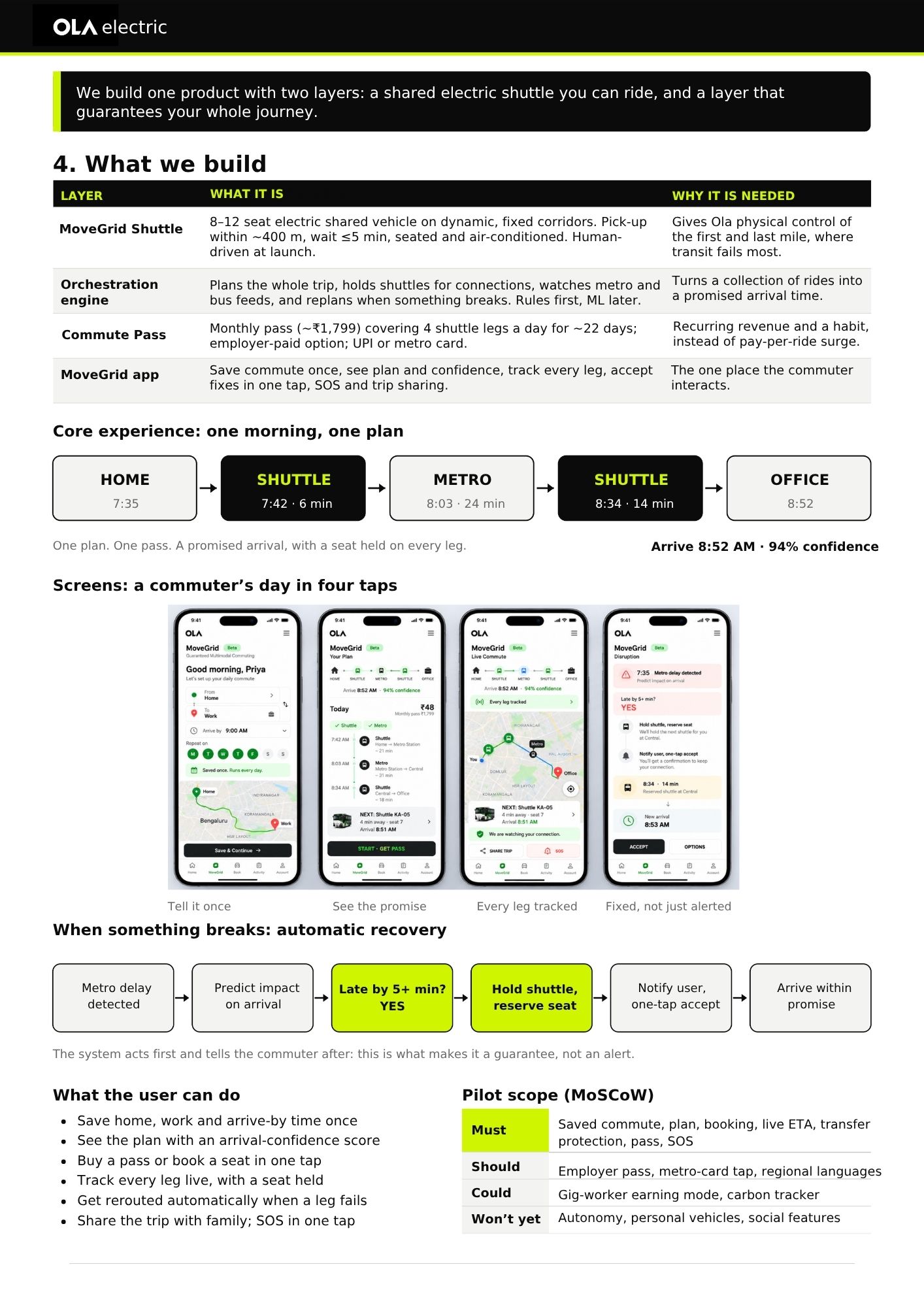
RICE also ranked orchestration first and autonomy lowest on confidence. Pilot scope by MoSCoW:
- Must: saved commute, plan, booking, live ETA, transfer protection, pass, SOS.
- Should: employer pass, metro-card tap, regional languages.
- Could: gig-worker earning mode, carbon tracker.
- Won't yet: autonomy, personal vehicles, social features.
Trade-offs accepted: human-driven first (gives up the driverless cost advantage, removes the biggest technology risk); a subscription over per-ride margin (retention and predictable demand); a hybrid fleet (control for capital efficiency); dense corridors only (breadth for utilisation).
4. User Stories & Requirements
Strategy Document Slides (5 Pages)
Click any slide to view full screen ↗
5. Solution
One product, two layers: a shared electric shuttle you can ride, and a layer that guarantees your whole journey.
- MoveGrid Shuttle: 8–12 seat EV on dynamic fixed corridors, pick-up within ~400 m, wait ≤5 min, human-driven at launch.
- Orchestration engine: plans the whole trip, holds shuttles for connections, watches metro and bus feeds, replans when something breaks. Rules first, ML later.
- Commute Pass: ~₹1,799 a month for 4 shuttle legs a day over ~22 days, with an employer-paid option.
- MoveGrid app: the one place the commuter interacts.
The system acts first and tells the commuter after, which makes it a guarantee, not an alert. Why Ola: vehicle manufacturing, cells and batteries, MoveOS software, service and charging network, and brand trust.
6. Execution
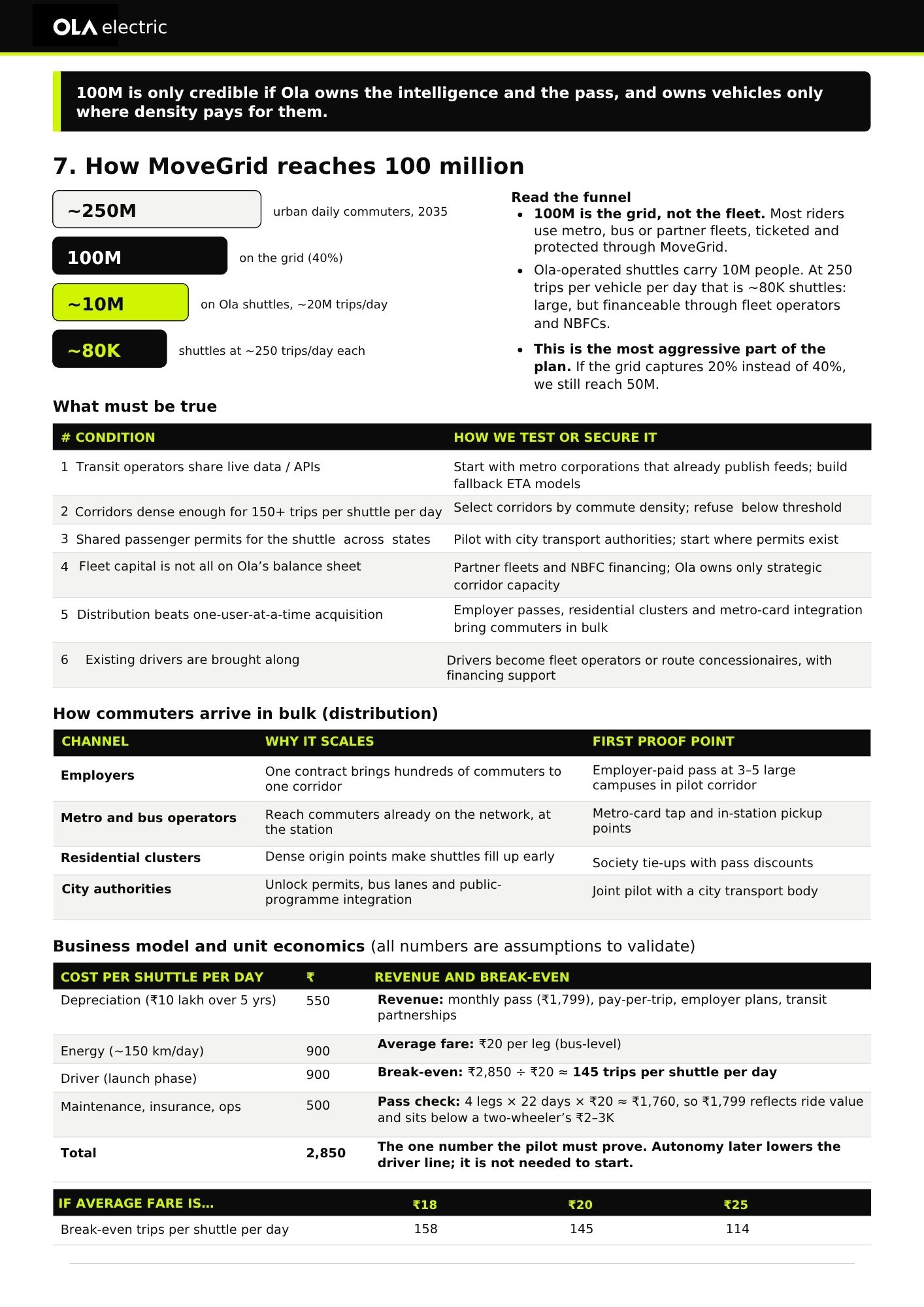
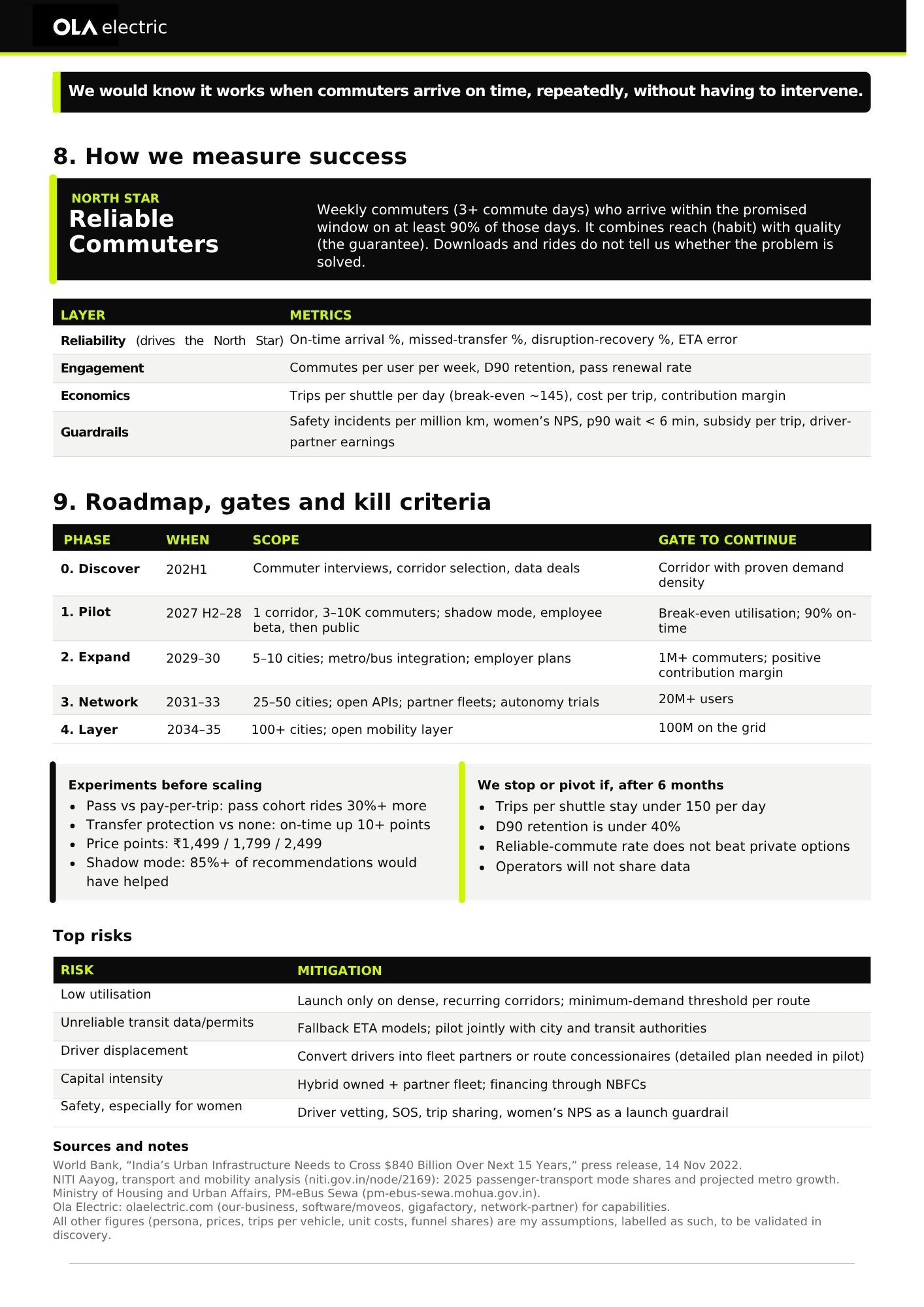
A hypothesis-to-pilot plan with gates and kill criteria. Roadmap: Discover (commuter interviews, corridor selection, data deals) → Pilot (1 corridor, 3–10K commuters; shadow mode, employee beta, then public; gate: break-even utilisation and 90% on-time) → Expand (5–10 cities; gate: 1M+ commuters, positive contribution margin) → Network → Layer (100M on the grid). Experiments before scaling: pass vs pay-per-trip, transfer protection vs none, three price points, shadow mode. Commuters arrive in bulk via employers, metro and bus operators, residential clusters and city authorities. Stop or pivot after 6 months if trips per shuttle stay under 150 a day, D90 retention is under 40%, the reliable-commute rate doesn't beat private options, or operators won't share data. Top risks: low utilisation, unreliable transit data and permits, driver displacement, capital intensity, safety (especially for women).
7. Outcome & Impact
A strategy, not a shipped product. What it enables: a commuter hands one trip to one plan and one pass, with a promised arrival. Modelled scale (assumptions to validate): ~100M of ~250M urban daily commuters on the grid (40%); ~10M on Ola shuttles (~20M trips a day), which means ~80K shuttles at ~250 trips each; if the grid captures 20% instead of 40%, it still reaches 50M. Unit economics (assumptions): ₹2,850 cost per shuttle per day, ₹20 average fare per leg, break-even ≈145 trips per shuttle per day, the one number the pilot must prove.
8. Metrics & Measurement
North Star is Reliable Commuters: weekly commuters (3+ commute days) who arrive within the promised window on at least 90% of those days. It combines habit (reach) with quality (the guarantee), and downloads and rides don't show whether the problem is solved. Layers: Reliability, Engagement, Economics, Guardrails.
5
Options evaluated
~145
Break-even trips/day
100M
Target grid (2035)